
DK999 Login – How to Log In to Your DK999 Account (2026)
The DK999 login takes about ten seconds once your account exists. Open the app or the website, type your number and password, and you’re in. It’s the same account either way, so your balance, bonuses and game history follow you between the app, a browser and any device you sign in on.
Most login trouble comes down to three things: the number typed with a leading zero, an OTP that hasn’t arrived yet, or a password that was never actually changed after a reset. This page walks through the login itself, then every error we see people hit and what fixes it.
On This Page
- Login Quick Facts
- How to Log In to DK999
- Forgot Your DK999 Password?
- Login Password vs Withdrawal Password
- Login Problems and Fixes
- Account Locked or Frozen
- Logging In on a New Phone
- Login Security Tips
- DK999 Login FAQs
Login Quick Facts
| Details | |
|---|---|
| What you need | Registered mobile number and password |
| Number format | Without the leading 0, e.g. 3001234567 |
| Works on | Android app, website, iPhone, PC |
| Same account everywhere | Yes, one balance across all devices |
| Password reset | By OTP to your registered number |
| Withdrawal password | Separate, set in account settings |
| No account yet | See the DK999 register guide |
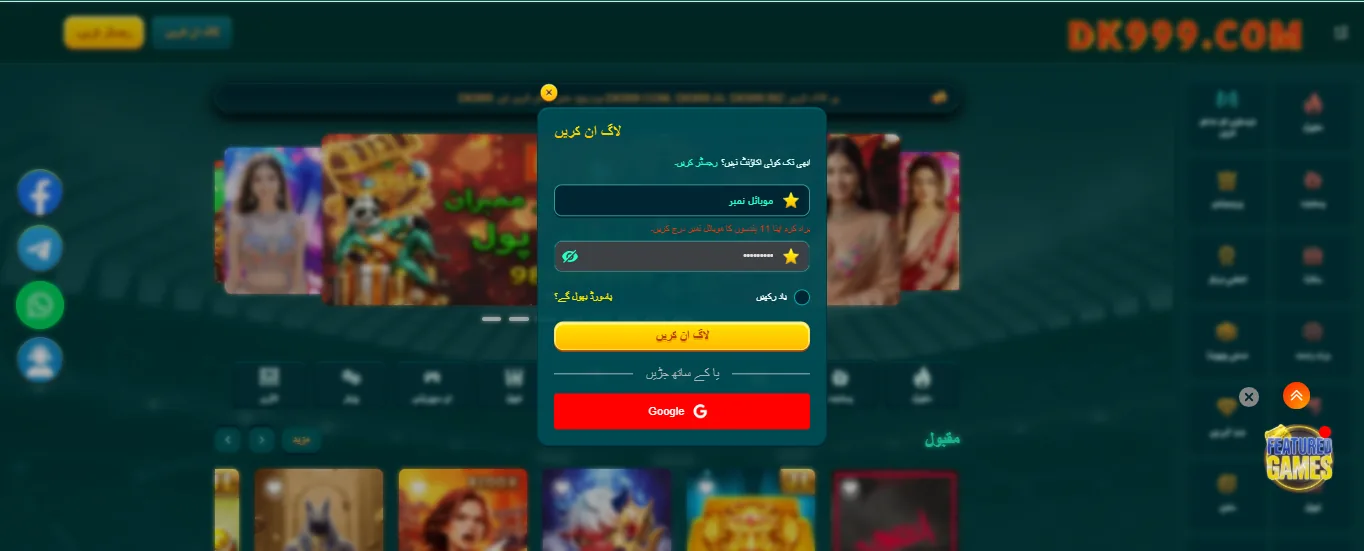
How to Log In to DK999
Log In on the Android App
- Open the DK999 app. If it isn’t installed, get it from our DK999 download page first.
- Tap Login on the opening screen.
- Enter your mobile number without the first 0. If you registered with 0300 1234567, type 3001234567, because the +92 country code is already filled in.
- Enter your password. It is case-sensitive, so check your keyboard isn’t capitalising the first letter.
- Tap Login. Your dashboard opens with your balance at the top.
Some versions offer “Remember me”. On your own phone that saves time. On a shared phone, leave it off.
Log In on the Website
Open the DK999 site in any browser and click Login at the top. The fields are the same: number without the leading zero, then your password. The website and the app share one account, so whatever you do in one shows up in the other within a few seconds.
Log In on iPhone
iPhones have no DK999 app, so you log in through Safari. If you saved the password to iCloud Keychain when you registered, Face ID fills it in for you. Adding the site to your home screen first makes this quicker and keeps you from clicking a lookalike link in search results — our DK999 for iOS guide shows how.
Log In on PC or Laptop
Open the site in Chrome or Edge and log in normally. Keep your phone nearby in case an OTP is needed. On a shared or office computer, don’t let the browser save the password and log out properly when you finish. The DK999 for PC guide covers the emulator route as well.
Forgot Your DK999 Password?
Resetting takes a minute and only needs the SIM you registered with:
- On the login screen, tap Forgot Password.
- Enter your registered mobile number, again without the leading 0.
- Tap Get Code and wait for the OTP by SMS.
- Type the code in, then set your new password.
- Log in with the new password straight away, so you know it worked.
Two things trip people up here. The OTP expires after a few minutes, so if you request several codes, only the newest one works. And on some versions the reset screen does not log you in automatically — it just saves the password and sends you back. If you skip that last step and close the app, you won’t know whether the change actually saved.
No Access to the Registered SIM?
The reset depends entirely on receiving that SMS. If the SIM is lost, blocked or you’ve changed numbers, there is no self-service route — you have to contact DK999 support on live chat and ask them to help you recover the account. Expect them to ask for proof it’s yours: your CNIC details as registered, recent deposit receipts with TIDs, and the approximate date you signed up. Have those ready before you message, or you’ll go back and forth for days.
Login Password vs Withdrawal Password
DK999 uses two separate passwords and mixing them up is a very common reason people think their login is broken.
| Login password | Withdrawal password | |
|---|---|---|
| Used for | Getting into your account | Approving a cash out |
| Set when | At registration | Later, in account settings |
| Reset by | Forgot Password + OTP | Account > Security, usually with an OTP |
| If someone steals it | They can see your account | They can take your money |
Keep them different, and keep both different from your JazzCash or Easypaisa PIN. If someone ever guesses your login, a separate withdrawal password is the thing that stops your balance walking out the door. Setting one is covered in the DK999 withdrawal guide.
DK999 Login Problems and Fixes
Find the message you’re seeing:
| Problem | Likely Cause | Fix |
|---|---|---|
| “Wrong password” but you’re sure it’s right | Leading 0 in the number, or the keyboard auto-capitalised the first letter | Retype the number as 3001234567 and check the password with the eye icon before tapping Login. |
| “Account does not exist” | Wrong number, or you never finished registration | Try the number again. If it still fails, you may have abandoned sign up part way — see the register guide. |
| OTP not arriving | Weak signal, full SMS inbox, or wrong SIM on a dual-SIM phone | Wait a full 60 seconds, then Resend. Check the code is going to the SIM you registered with. |
| OTP says “invalid” or “expired” | You used an older SMS | Request a fresh code and use only the newest one. |
| Stuck on the loading screen | Connection, or the phone clock is wrong | Switch between Wi-Fi and mobile data, turn off any VPN, and set date and time to automatic. |
| App crashes right after login | Old app version or corrupted cache | Clear the app cache, then install the latest APK over the top from the download page. |
| Login works on the app but not the website | Stale browser cache or cookies blocked | Clear the site data, allow cookies for DK999, and avoid Incognito mode. |
| Keeps logging you out | Private browsing, or website data being cleared | Use a normal tab, or the home screen icon on iPhone. |
| “Too many attempts” | Several wrong passwords in a row | Wait 15 to 30 minutes before trying again. More attempts extend the block. |
| Account locked | Repeated failures or a security review | See the next section. |
Account Locked or Frozen
A lock is not the same as a wrong password. If you can type the right details and still can’t get in, it is usually one of these: too many failed attempts, more than one account found on the same phone or wallet, a name that didn’t match at withdrawal, or unusual betting right after a bonus. The account rules list what triggers each one.
Message support on live chat, say plainly what happened, and send your user ID, registered number and a couple of deposit screenshots. A calm, complete first message gets this sorted far faster than several angry short ones.
Logging In on a New Phone
Changed phones? Nothing special is needed. Install the app (or open the site), log in with the same number and password, and your balance, bonuses, VIP level and history are all there. None of it is stored on the handset.
Two things worth knowing before you wipe the old phone. Make sure you actually remember your password rather than relying on a saved one, because the old device may be the only place it’s stored. And keep the registered SIM reachable, since a new device sometimes triggers an OTP check.
You can stay logged in on more than one device at a time — phone and laptop together is fine. What you shouldn’t do is let another person use your account from their device. Accounts shared between people are exactly what the security checks look for.
Can’t Find the Login Page?
DK999’s web address changes from time to time, so a bookmark from a few months ago may not load. Don’t grab the first new link somebody forwards in a group. If you have the Android app it usually keeps working regardless, and our real or fake guide has a two-minute check for any link before you type your password into it.
DK999 Login Security Tips
- Never share your OTP. DK999 support will never ask for it, so anyone who does is trying to take your account.
- Only log in on a page you reached yourself, through the app or a saved bookmark. Fake DK999 login screens exist purely to collect numbers and passwords.
- Use three different secrets: login password, withdrawal password, and wallet PIN.
- Turn off “Remember me” and password saving on any shared or cyber café computer, and log out when you leave.
- If a “support agent” messages you first on WhatsApp, it isn’t support. Real help is in the live chat inside the app or site.
- Change your password immediately if you ever typed it into a site you later doubted.
DK999 Login FAQs
How do I log in to DK999?
Open the app or website, tap Login, enter your registered mobile number without the leading 0, type your password and tap Login.
Why does DK999 say wrong password when it’s correct?
Usually the number was typed with a leading 0, or the keyboard capitalised the first letter of the password. Check both, then use Forgot Password.
How do I reset my DK999 password?
Tap Forgot Password on the login screen, enter your registered number, confirm the OTP and set a new one. Log in once right away to confirm it saved.
Can I log in without my registered mobile number?
No. The number is your username and it receives the OTP for resets. If you’ve lost the SIM, contact support with your CNIC details and deposit receipts.
Can I log in on the app and website at the same time?
Yes. One account works across the app, the website and any device, and the balance stays in sync.
Why is my DK999 account locked?
Usually too many wrong password attempts, or a security review over duplicate accounts or a name mismatch. Contact live chat to unlock it.
What is the DK999 withdrawal password?
A second password used only to approve cash outs. You set it in account settings, and it should be different from your login password.
Do I lose my balance if I log in on a new phone?
No. Your balance is tied to the account, not the device. Just log in with the same number and password.
Why does the login page not load?
The web address may have changed, or your connection is blocked. Try the app, switch between Wi-Fi and mobile data, and turn off any VPN.
Is it safe to stay logged in?
On your own phone, yes, ideally behind a screen lock. On a shared phone, log out every time.
DK999 is a real money game for adults 18 and over. Set a budget before you play — our responsible gaming guide has limits that actually hold.
More DK999 Guides
Start at the DK999 game hub, or jump to another guide: